
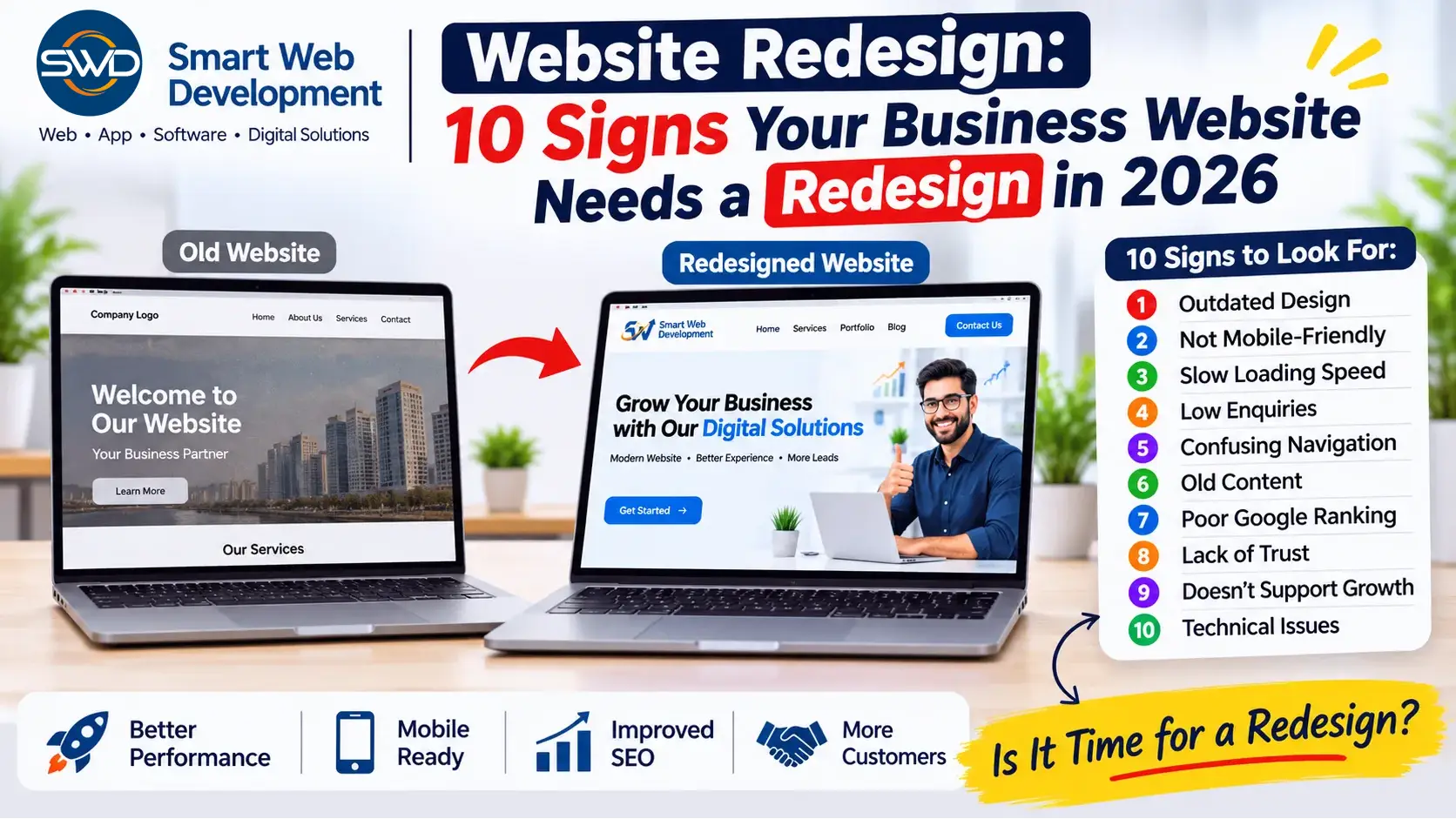
10 Signs Your Business Website Needs a Redesign in 2026
Your business website is often the first place potential customers visit to learn about your company, products, and services. Before contacting you, many customers check your website to understand what you offer and whether your business is trustworthy.
But what if your website looks outdated, loads slowly, does not work properly on mobile devices, or fails to generate enquiries?
An old or poorly designed website can create a negative impression and may cause potential customers to leave without contacting your business.
This is why website redesign is important. A professional website redesign can improve your online presence, user experience, website performance, and overall business credibility.
In this blog, we will discuss 10 important signs your business website needs a redesign in 2026, along with practical solutions to improve your website.
1. Your Website Design Looks Outdated
Website design trends and user expectations continue to change. A website that looked professional five or six years ago may now appear outdated.
Common signs of an outdated website include:
- Old-fashioned layouts and colours.
- Small or difficult-to-read fonts.
- Poor-quality images.
- Cluttered homepage sections.
- Inconsistent design across pages.
- Old navigation menus.
- Lack of modern visual elements.
When visitors land on an outdated website, they may question whether your business is active or professional.
How to fix it:
Consider updating your website with a clean layout, modern typography, professional images, consistent brand colours, clear navigation, and well-organised content.
A modern website should reflect your business identity and make important information easy to find.
2. Your Website Is Not Mobile-Friendly
A large number of people browse websites using smartphones and tablets. If your website does not display properly on mobile devices, visitors may struggle to read content or contact your business.
Some common mobile website problems include:
- Text appearing too small.
- Images extending beyond the screen.
- Buttons being difficult to click.
- Menus not opening correctly.
- Content overlapping.
- Forms being difficult to complete.
A poor mobile experience can lead visitors to leave your website.
How to fix it:
Make sure your website uses responsive web design. Your website should automatically adjust its layout for desktops, tablets, and mobile phones.
Test important pages, navigation, buttons, forms, images, and contact options on different screen sizes.
3. Your Website Loads Slowly
Website speed plays an important role in user experience. Visitors generally expect websites to load quickly.
If your website takes too long to load, users may leave before viewing your services or products.
Common reasons for slow website performance include:
- Large, uncompressed images.
- Poor-quality hosting.
- Too many unnecessary plugins.
- Unoptimised JavaScript and CSS.
- Excessive third-party scripts.
- Poor caching configuration.
- Database performance issues.
How to fix it:
Improve website speed by:
- Compressing and optimising images.
- Using modern image formats such as WebP.
- Removing unnecessary plugins and scripts.
- Enabling suitable caching.
- Choosing reliable hosting.
- Optimising website code.
- Monitoring Core Web Vitals.
You can use Google PageSpeed Insights to identify performance issues and improvement opportunities.
4. Your Website Is Not Generating Leads or Enquiries
A business website should do more than display company information. It should help potential customers contact your business.
If your website receives visitors but very few enquiries, the design, content, or user journey may need improvement.
Possible reasons include:
- No clear call-to-action buttons.
- Contact details are difficult to find.
- Contact forms are too complicated.
- Services are not explained properly.
- No clear information about your business.
- Poor homepage structure.
- Lack of customer testimonials or trust signals.
How to fix it:
Add clear call-to-action buttons such as:
- Get a Free Consultation.
- Request a Quote.
- Contact Us.
- Talk to Our Team.
- Get Started Today.
Make your phone number, email address, WhatsApp contact, and enquiry form easy to find.
Also explain your services clearly so visitors understand how your business can help them.
5. Your Website Navigation Is Confusing
Website navigation helps visitors find the information they need.
If users cannot easily locate your services, company details, pricing information, or contact page, they may leave your website.
Common navigation problems include:
- Too many menu items.
- Unclear menu labels.
- Important pages hidden in submenus.
- Broken navigation links.
- No logical page structure.
- Difficult mobile menus.
How to fix it:
Create a simple and organised navigation menu.
For example:
- Home
- About Us
- Services
- Portfolio
- Blog
- Contact Us
Use clear headings and organise related services under suitable categories.
The goal is to help visitors find important information with minimum effort.
6. Your Website Content Is Old or Irrelevant
Your website content should accurately represent your current business, services, products, and expertise.
If your website still displays old offers, outdated contact details, discontinued services, or irrelevant information, visitors may lose confidence in your business.
Content problems may include:
- Old company information.
- Outdated service descriptions.
- Missing product details.
- Incorrect phone numbers or email addresses.
- Old blog articles without updates.
- Duplicate or poorly written content.
- Missing important service pages.
How to fix it:
Review your website content regularly.
Update your company profile, service descriptions, contact information, images, FAQs, and blog articles.
Use clear, helpful content that answers customer questions and explains the benefits of your products or services.
7. Your Website Is Not Performing Well on Google
A professional-looking website is not enough if potential customers cannot find it through search engines.
If your website is not appearing for relevant search terms, it may have technical or content-related SEO issues.
Common website SEO problems include:
- Missing or duplicate page titles.
- Poor meta descriptions.
- Incorrect heading structure.
- Broken links.
- Missing image alt text.
- Slow loading speed.
- Poor internal linking.
- Incorrect canonical URLs.
- Missing or incorrect sitemap configuration.
- Poor-quality or irrelevant content.
How to fix it:
Review your website’s technical and on-page SEO.
Important steps include:
- Create unique SEO titles and meta descriptions.
- Use relevant keywords naturally.
- Organise content with proper H1, H2, and H3 headings.
- Add descriptive image alt text.
- Fix broken links and redirect errors.
- Improve internal linking.
- Check mobile usability and website speed.
- Submit your sitemap through Google Search Console.
Remember that redesigning a website alone does not guarantee higher Google rankings. SEO requires consistent technical improvements, useful content, and ongoing optimisation.
8. Your Website Does Not Build Customer Trust
Customers want to feel confident before purchasing a product or contacting a service provider.
If your website does not provide enough information about your business, visitors may hesitate to take the next step.
Some missing trust elements include:
- No proper About Us page.
- No business address or contact details.
- No portfolio or previous work.
- No customer testimonials.
- No clear service information.
- No privacy policy.
- No secure HTTPS connection.
How to fix it:
Add important trust-building sections to your website, such as:
- About Our Company.
- Our Services.
- Portfolio or Case Studies.
- Customer Reviews.
- Frequently Asked Questions.
- Contact Information.
- Privacy Policy and Terms.
Display genuine customer feedback and real project examples wherever possible.
A transparent website helps visitors understand your business and make informed decisions.
9. Your Website Cannot Support Your Growing Business
Your business requirements may change as your company grows.
A website that was suitable when your business started may no longer support your current needs.
For example, you may now require:
- Additional service pages.
- Online appointment booking.
- eCommerce functionality.
- Customer login accounts.
- Payment gateway integration.
- CRM integration.
- Custom dashboards.
- Automated enquiry management.
- Advanced search and filtering.
If your existing website cannot support these requirements efficiently, it may be time to consider a redesign or a more substantial development upgrade.
How to fix it:
Review your current website structure and future business goals.
A professional developer can help you decide whether to improve the existing website, rebuild selected sections, integrate new functionality, or develop a completely new platform.
10. Your Website Has Technical Issues and Is Difficult to Maintain
A website requires regular technical maintenance to remain secure, functional, and reliable.
If your website frequently experiences errors or becomes difficult to update, it may need technical improvements.
Common problems include:
- Broken pages and links.
- Contact forms not working.
- Plugin or theme conflicts.
- Outdated software.
- Security warnings.
- Incorrect redirects.
- Backup problems.
- Website errors after updates.
- Poor hosting configuration.
How to fix it:
Start with a technical website audit.
Check your website’s software, plugins, forms, backups, security settings, hosting, database, and important page functionality.
Depending on the issues, you may need maintenance, performance optimisation, a technical upgrade, or a complete redesign.
Benefits of Redesigning Your Business Website
A properly planned website redesign can provide several benefits.
1. Better First Impression
A modern website helps your business present a professional image and communicate its brand identity.
2. Improved User Experience
Clear navigation, readable content, and responsive layouts make it easier for visitors to explore your website.
3. Better Mobile Experience
Responsive design helps customers access your website across smartphones, tablets, and desktops.
4. Improved Website Performance
Performance optimisation can reduce unnecessary loading delays and improve the browsing experience.
5. More Opportunities to Generate Leads
Clear service pages, contact information, enquiry forms, and call-to-action buttons can make it easier for potential customers to contact you.
6. Easier Content Management
A suitable CMS or website management system can make updating pages, images, and blog content easier.
7. Better Support for Business Growth
A well-planned website structure can accommodate additional services, pages, and functionality as your business develops.
Website Redesign vs Website Development: What Is the Difference?
Many business owners use these terms interchangeably, but they are not exactly the same.
Website redesign focuses on improving an existing website’s appearance, layout, content presentation, and user experience. It may also include technical and performance improvements.
Website development involves creating website functionality and structure. It may include building a new website, developing custom features, integrating databases, and connecting third-party services.
Depending on your requirements, a project may involve redesign, development, or both.
How Much Does Website Redesign Cost in India?
Website redesign costs depend on the condition of your existing website and the improvements required.
Some important factors that influence the cost include:
- Number of pages.
- Design complexity.
- CMS or development technology.
- Mobile responsiveness.
- Content rewriting.
- SEO requirements.
- Speed optimisation.
- Custom functionality.
- Third-party integrations.
- Migration and testing requirements.
A simple visual refresh may require less work than rebuilding a large website with custom functionality.
Before requesting a quotation, prepare a list of the changes you need. This helps the developer understand the scope and provide a more accurate estimate.
Important: A website redesign should not be judged only by its price. Consider design quality, performance, mobile usability, SEO preservation, security, and post-launch support.
Website Redesign Checklist Before Starting Your Project
Before redesigning your business website, review the following checklist:
- Review the current website design.
- Check mobile responsiveness.
- Test website loading speed.
- Review existing website content.
- Identify important pages and services.
- Check contact forms and enquiry options.
- Review current SEO performance.
- Identify broken links and technical issues.
- Prepare new design and functionality requirements.
- Take a complete website backup.
- Plan URL redirects where URLs will change.
- Test the redesigned website before launch.
Following this checklist can help reduce common redesign problems.
Common Website Redesign Mistakes to Avoid
A redesign project can create new problems if it is not planned properly.
Avoid these common mistakes:
1. Changing URLs Without Redirects
If existing URLs change, relevant old URLs should be redirected properly to their new destinations. Otherwise, visitors and search engines may encounter broken pages.
2. Ignoring Existing SEO Rankings
Before redesigning, review important keywords, indexed pages, backlinks, and organic traffic. Preserve valuable content and URL structures wherever possible.
3. Focusing Only on Appearance
A beautiful website is not enough. It should also be fast, mobile-friendly, accessible, easy to navigate, and functional.
4. Not Testing Contact Forms
Always test enquiry forms, email notifications, phone links, WhatsApp links, and other conversion features before launch.
5. Forgetting Website Backups
Keep a complete backup of the existing website before making major changes.
6. Ignoring Future Business Requirements
Plan the website structure so that it can support your business as it grows.
Final Thoughts
Your business website is an important part of your online identity. It helps customers understand your services, evaluate your business, and decide whether they want to contact you.
If your website looks outdated, performs poorly on mobile devices, loads slowly, has technical issues, or fails to generate enquiries, it may be time to consider a redesign.
However, a complete redesign is not always necessary. Sometimes, improving website speed, updating content, fixing technical errors, or redesigning a few important pages can solve the problem.
The right decision depends on your website’s current condition, business goals, and future requirements.
A professional website should not only look good; it should also provide a smooth user experience and support your business growth.
Need a Professional Website Redesign?
Is your existing website outdated, slow, or not generating enough enquiries?
Smart Web Development helps businesses improve their online presence with professional website design and development solutions.
Our services include:
- Website Redesign.
- Website Design & Development.
- WordPress Website Development.
- Custom Website Development.
- eCommerce Website Development.
- Custom Software Development.
- Web Application Development.
- Website Maintenance and Support.
Whether you need a complete website redesign or improvements to your existing website, we can help you plan a solution according to your business requirements.
Contact Smart Web Development today:
Website: https://smartwebdevelopment.in/
Email: info@smartwebdevelopment.in
Phone: 9310087565
Let’s build a professional website that supports your business growth.
Frequently Asked Questions (FAQs)
1. How often should a business website be redesigned?
There is no fixed redesign schedule. A website should be reviewed regularly and redesigned when its design, functionality, performance, or technology no longer meets business requirements.
2. How do I know if my website needs a redesign?
Common signs include outdated design, poor mobile responsiveness, slow loading speed, difficult navigation, outdated content, technical problems, and low enquiry rates.
3. Will redesigning my website improve Google rankings?
A redesign can create opportunities to improve mobile usability, speed, content structure, and technical SEO. However, it does not guarantee higher rankings. Proper SEO planning and ongoing optimisation are important.
4. Will I lose my Google rankings after a website redesign?
Not necessarily. However, changing URLs, removing content, or introducing technical errors can affect search visibility. Proper URL mapping, redirects, content preservation, and SEO checks help reduce the risk.
5. Can I redesign my existing WordPress website?
Yes. An existing WordPress website can be redesigned by updating its theme, page layouts, content, plugins, and custom functionality. The exact approach depends on the website’s condition and requirements.
6. Is website redesign better than building a new website?
It depends on the existing website. If the current structure and technology are suitable, redesigning may be enough. If the website has major technical limitations, rebuilding may be a better option.
7. Will my website work on mobile after redesign?
A professionally planned responsive redesign should make the website suitable for different screen sizes. It should be tested on mobile phones, tablets, and desktops.
8. How long does a website redesign take?
The timeline depends on the number of pages, design complexity, content requirements, custom features, integrations, and testing. A simple redesign generally takes less time than a large website rebuild.
9. Do I need new hosting for a website redesign?
Not always. Existing hosting may be sufficient if it meets the website’s technical and performance requirements. Hosting should be reviewed before the redesign begins.
10. What should I prepare before hiring a website redesign company?
Prepare your existing website URL, business details, required changes, reference websites, branding materials, content, functionality requirements, and budget. This helps the development team understand your project clearly.






Add comment