
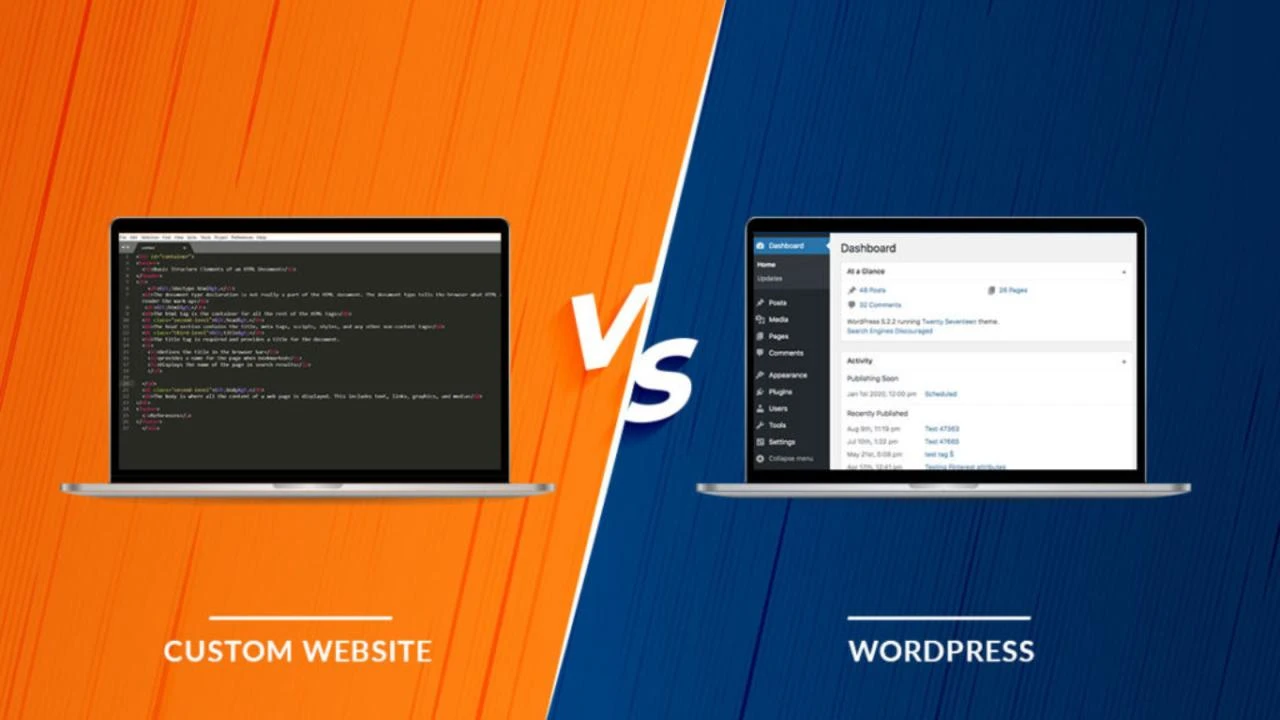
WordPress vs Custom Website Development: Which Is Better for Your Business in 2026?
Choosing the right technology for your business website is an important decision. A website is not just an online presence; it helps your business build credibility, attract potential customers, generate leads, and grow online.
When planning a new website, many business owners face one common question: Should I choose WordPress or custom website development?
Both options have their own advantages and limitations. WordPress is a popular content management system that allows businesses to create and manage websites without extensive coding. Custom website development, on the other hand, involves building a website according to specific business requirements, design preferences, and functionality.
In this guide, we will compare WordPress vs custom website development in terms of cost, flexibility, performance, security, scalability, maintenance, and business requirements. By the end, you will understand which option is more suitable for your business in 2026.
1. What Is WordPress Website Development?
WordPress is an open-source Content Management System (CMS) used to create and manage websites. It is one of the most widely used platforms for business websites, blogs, portfolios, and eCommerce stores.
With WordPress, developers can use themes, plugins, page builders, and custom code to create websites according to business requirements.
Key Features of WordPress
- Easy-to-manage content management system.
- Thousands of themes and plugins.
- Responsive website design options.
- SEO-friendly structure with suitable configuration.
- Blog and content publishing functionality.
- eCommerce functionality through WooCommerce.
- Customisation through themes, plugins, and coding.
- Integration with third-party services and APIs.
Who Should Choose WordPress?
WordPress can be a suitable choice for:
- Small and medium-sized businesses.
- Startups and new businesses.
- Company profile websites.
- Service-based business websites.
- Blogs and news websites.
- Portfolio websites.
- Small and medium-sized eCommerce stores.
For businesses that need a professional website with manageable content and commonly required features, WordPress can be a practical solution.
2. What Is Custom Website Development?
Custom website development means creating a website from the ground up or building its core functionality specifically around a business’s requirements.
Instead of depending entirely on ready-made themes or plugins, developers write code and create custom features, layouts, databases, and integrations.
Depending on the project, technologies may include HTML, CSS, JavaScript, PHP, Laravel, React, Node.js, Python, and other frameworks.
Key Features of Custom Website Development
- Unique website design and user experience.
- Business-specific features and functionality.
- Custom database structure.
- Advanced API and third-party integrations.
- Greater control over application architecture.
- Custom user roles and access permissions.
- Flexible development for complex workflows.
- Ability to build specialised web applications.
Who Should Choose Custom Website Development?
Custom development may be suitable for:
- Businesses with unique operational requirements.
- Large eCommerce platforms.
- Booking and reservation portals.
- CRM and ERP systems.
- Inventory and management software.
- Multi-vendor marketplaces.
- Customer portals and dashboards.
- Businesses requiring complex integrations.
If your business needs functionality that cannot be handled efficiently by standard themes and plugins, custom development may be the better option.
3. WordPress vs Custom Website Development: Key Differences
Let’s compare both development approaches across important factors.
| Comparison Factor | WordPress | Custom Development |
|---|---|---|
| Development approach | CMS-based | Built around project requirements |
| Initial cost | Often lower | Often higher |
| Development time | Usually faster | Depends on complexity |
| Design flexibility | High with customisation | Very high |
| Functionality | Themes, plugins and custom code | Custom-built features |
| Content management | Built-in CMS | CMS can be developed or integrated |
| Maintenance | Updates and plugin management | Depends on architecture |
| Scalability | Suitable for many growing websites | Can be designed for specific growth needs |
| Integrations | Plugins and APIs | Custom API integrations |
| Technical expertise | Moderate for routine management | Often requires developer support |
Important: These are general comparisons. Actual cost, performance, security, and development time depend on the website’s features, hosting, code quality, integrations, and maintenance.
4. Cost Comparison: WordPress vs Custom Website Development
Budget is one of the biggest factors when selecting a website development approach.
WordPress projects can often be developed more economically because the CMS, themes, and many plugins are already available. Custom development may require additional planning, programming, database design, testing, and deployment.
WordPress Website Development Cost
The cost depends on design complexity, number of pages, customisation, plugins, and integrations.
Common project types include:
- Basic business website.
- Professional company website.
- Service-based website.
- Blog or content website.
- WooCommerce eCommerce website.
Custom Website Development Cost
Custom website development costs depend on the functionality and complexity of the project.
Examples include:
- Custom business portals.
- Online booking systems.
- Customer management portals.
- Inventory management systems.
- Multi-vendor platforms.
- Custom web applications.
These projects may require additional development time for user accounts, dashboards, database management, payment integration, reporting, and security.
Which Is More Affordable?
For a standard business website, WordPress is often more cost-effective.
For a business requiring specialised functionality, custom development may offer better long-term value if it avoids unnecessary plugins, workarounds, or limitations.
Rather than choosing only by initial price, compare the total cost of development, hosting, maintenance, future changes, and support.
5. Design and Customisation: Which Offers More Flexibility?
Your website design creates the first impression of your business. It should reflect your brand, communicate your services, and make it easy for visitors to take action.
WordPress Design Flexibility
WordPress provides a wide range of themes and page builders that help developers create professional website layouts.
You can customise:
- Homepage layouts.
- Service pages.
- Contact forms.
- Blog designs.
- Landing pages.
- Header and footer sections.
- Mobile-responsive layouts.
Custom CSS, JavaScript, PHP, and theme development can extend WordPress beyond its standard appearance.
Custom Website Design Flexibility
Custom development gives developers greater control over the website’s structure and user experience.
It is useful when a business requires:
- Unique interactive designs.
- Specialised user dashboards.
- Complex navigation.
- Custom booking workflows.
- Advanced search and filtering.
- Business-specific user journeys.
Verdict: Both approaches can deliver professional designs. Custom development is especially useful when the design and functionality must follow a unique business process.
6. Website Speed and Performance
Website speed affects user experience and can influence how visitors interact with your business.
A slow website may frustrate users, increase abandonment, and reduce enquiries.
WordPress Performance
WordPress websites can load quickly when properly developed and maintained.
Performance depends on:
- Quality of hosting.
- Lightweight themes.
- Properly configured plugins.
- Image compression.
- Caching.
- Database optimisation.
- CDN configuration where appropriate.
- Clean and efficient code.
Installing too many unnecessary plugins or using poorly optimised themes can affect performance.
Custom Website Performance
Custom websites can be designed around specific performance requirements.
Developers can optimise:
- Database queries.
- Server-side processing.
- Front-end assets.
- API requests.
- Caching strategies.
- Application architecture.
However, custom development does not automatically guarantee a faster website. Poorly written custom code can also create performance problems.
Verdict: Both WordPress and custom websites can perform well. Good development, hosting, and ongoing optimisation matter more than the platform name alone.
7. SEO: WordPress vs Custom Website Development
Search Engine Optimisation (SEO) helps your website appear in relevant search results and attract organic visitors.
Both WordPress and custom websites can be SEO-friendly when developed correctly.
WordPress SEO Features
WordPress provides tools and features that help with SEO, including:
- SEO plugins such as Yoast SEO.
- Custom page titles and meta descriptions.
- XML sitemap generation.
- Permalink configuration.
- Image alt text.
- Blog publishing.
- Schema markup through suitable plugins or custom implementation.
Custom Website SEO Features
Custom websites can also support all major SEO requirements, including:
- Search engine-friendly URLs.
- Custom meta titles and descriptions.
- XML sitemaps.
- Robots.txt configuration.
- Structured data.
- Canonical URLs.
- Open Graph tags.
- Website speed optimisation.
- Technical SEO implementation.
Verdict: WordPress can make SEO management easier for many business owners, but custom websites can achieve equally strong SEO foundations. Rankings depend on content quality, technical SEO, website authority, competition, and user experience—not simply the platform.
8. Security and Website Maintenance
Website security is essential for protecting business information, customer data, and website operations.
WordPress Security
WordPress websites require regular maintenance.
Important security practices include:
- Keep WordPress core updated.
- Update themes and plugins.
- Use strong passwords.
- Enable SSL.
- Install reputable security tools where appropriate.
- Take regular backups.
- Remove unused plugins and themes.
- Use secure hosting.
- Restrict unnecessary user permissions.
Custom Website Security
Custom applications require security measures based on their architecture and functionality.
These may include:
- Secure authentication.
- Role-based access control.
- Input validation.
- Protection against SQL injection and cross-site scripting.
- Secure API endpoints.
- Data encryption where appropriate.
- Regular code reviews.
- Server and database security.
- Backup and recovery procedures.
Verdict: Neither approach is automatically secure. Security depends on development quality, configuration, updates, hosting, and ongoing maintenance.
9. Scalability: Which Is Better for Business Growth?
A business website should be able to support future growth.
Your requirements may change as your business expands. You may need new pages, services, integrations, user accounts, or advanced features.
WordPress Scalability
WordPress can support many growing businesses through:
- Additional pages and content.
- WooCommerce functionality.
- Membership systems.
- Booking plugins.
- CRM integrations.
- Custom post types.
- Custom plugins.
- Hosting and performance upgrades.
For many business websites and content-driven platforms, WordPress can remain a suitable long-term solution.
Custom Website Scalability
Custom development allows the application architecture to be designed around specific business needs.
It can be useful when you need:
- Multiple user roles.
- Complex business workflows.
- Large product or service databases.
- Advanced reporting systems.
- Custom dashboards.
- Multiple API integrations.
- Specialised application functionality.
However, scalability still depends on architecture, infrastructure, development quality, and future maintenance.
Verdict: WordPress is suitable for many growing websites. Custom development may be more appropriate when business operations require complex or specialised functionality.
10. WordPress vs Custom Development for eCommerce Websites
If you want to sell products or services online, both options can support eCommerce.
WordPress with WooCommerce
WooCommerce can help businesses create online stores with features such as:
- Product management.
- Shopping cart.
- Checkout.
- Payment gateway integration.
- Order management.
- Shipping configuration.
- Discount coupons.
- Customer accounts.
It is a practical option for many small and medium-sized online stores.
Custom eCommerce Development
A custom eCommerce platform may be suitable for businesses requiring:
- Advanced product configuration.
- Custom pricing rules.
- Multi-vendor functionality.
- Complex order management.
- Specialised inventory systems.
- Custom delivery workflows.
- Advanced customer dashboards.
- Unique third-party integrations.
Verdict: WooCommerce is often a good starting point for standard online stores. Custom eCommerce development is worth considering when the business model requires specialised features or workflows.
11. How to Choose the Right Option for Your Business
Before selecting WordPress or custom development, understand what your business actually needs.
Ask yourself these questions:
- Do I need a simple business website or a web application?
- How many pages and sections will the website require?
- Do I need to update content regularly?
- Will customers need to log in?
- Do I need online payments or booking functionality?
- Are third-party API integrations required?
- Do I need custom dashboards or reports?
- What is my development budget?
- How frequently will the website need changes?
- What features might I need in the future?
Your answers will help you identify the most suitable development approach.
Choose WordPress If:
- You need a professional business website.
- You want to publish blogs and update content.
- You need a service-based website.
- You want a standard WooCommerce store.
- Your requirements can be handled through existing features and suitable customisation.
- You want a manageable and cost-effective starting point.
Choose Custom Website Development If:
- You need specialised business functionality.
- You require complex user dashboards.
- Your website involves advanced workflows.
- You need a custom booking or management system.
- You require complex database operations.
- Standard CMS solutions cannot efficiently meet your requirements.
12. Can WordPress and Custom Development Be Combined?
Yes. A business does not always have to choose only one approach.
WordPress can be used for content management and business information, while custom code or separate applications can handle specialised functionality.
For example:
- A WordPress website can manage company pages and blogs.
- A custom booking system can handle reservations.
- A separate application can manage customer accounts.
- APIs can connect the website with CRM or business software.
- WooCommerce can handle standard online sales while custom integrations manage special business processes.
This hybrid approach can be useful when a business wants the convenience of WordPress along with specialised functionality.
13. Common Mistakes to Avoid When Choosing a Website Development Platform
Before starting your project, avoid these common mistakes:
1. Choosing only by the lowest price
A low initial price may not include essential features, security, support, or future maintenance.
2. Ignoring future requirements
Think about how your website may need to grow over the next few years.
3. Installing too many plugins
Unnecessary plugins can increase maintenance requirements and may affect performance or security.
4. Ignoring mobile responsiveness
Your website should provide a good experience across mobile phones, tablets, and desktops.
5. Forgetting SEO
SEO-friendly URLs, headings, metadata, structured data, and technical configuration should be considered during development.
6. Not planning website maintenance
Every website needs updates, backups, security checks, and performance monitoring.
7. Not checking the developer’s portfolio
Review previous projects, functionality, design quality, and relevant experience before selecting a development partner.
14. Final Verdict: WordPress or Custom Website Development in 2026?
There is no single answer that works for every business. The right choice depends on your goals, budget, functionality, and future plans.
WordPress is an excellent option for many business websites, blogs, service websites, and standard eCommerce stores. It provides a flexible content management system and can be customised according to business requirements.
Custom website development is more suitable when a business needs specialised functionality, complex workflows, advanced integrations, or a dedicated web application.
The most important thing is to select a solution that meets your current requirements while allowing your business to grow.
A good website is not defined by the technology used to build it. It is defined by how effectively it serves your customers and supports your business goals.
15. Need Help Choosing the Right Website Development Solution?
Not sure whether WordPress or custom website development is right for your business?
Smart Web Development provides website design and development solutions for businesses looking to establish and grow their online presence.
Our services include:
- WordPress Website Design & Development.
- Custom Website Development.
- eCommerce Website Development.
- Custom Software Development.
- Web Application Development.
- Business Website Development.
- Website Maintenance and Support.
We can help you understand your requirements and choose a suitable development approach for your project.
Get in touch with Smart Web Development:
- Website: https://smartwebdevelopment.in/
- Email: info@smartwebdevelopment.in
- Phone: 9310087565
Contact us today to discuss your website development requirements.
Frequently Asked Questions (FAQs)
1. Is WordPress better than custom website development?
WordPress is often better for standard business websites, blogs, and many eCommerce stores. Custom development may be better for businesses requiring specialised features, complex workflows, or dedicated web applications.
2. Is custom website development more expensive than WordPress?
Custom development often has a higher initial cost because it may require additional planning, coding, database design, and testing. The actual cost depends on project complexity and requirements.
3. Can a WordPress website be customised?
Yes. WordPress websites can be customised using themes, plugins, custom CSS, JavaScript, PHP, custom post types, and custom plugin development.
4. Which is better for SEO: WordPress or custom websites?
Both can be SEO-friendly. WordPress offers convenient SEO tools, while custom websites can implement SEO features through development. Rankings depend on several factors, including content, technical SEO, competition, and website authority.
5. Is WordPress suitable for eCommerce websites?
Yes. WordPress with WooCommerce can support product listings, shopping carts, checkout, payments, orders, and other common eCommerce features.
6. Can I convert my WordPress website into a custom website later?
Yes. A business can migrate from WordPress to a custom platform. However, the process requires planning for content, URLs, databases, functionality, SEO redirects, and testing.
7. Which option is best for a small business?
For many small businesses that need a professional company or service website, WordPress is a practical choice. If the business requires specialised software or complex functionality, custom development may be more suitable.
8. Does a custom website require maintenance?
Yes. Custom websites also need regular security updates, backups, performance monitoring, bug fixes, and technical maintenance.
9. Can WordPress handle a large website?
WordPress can support large content websites and many business platforms when properly developed, hosted, and maintained. The right infrastructure and architecture are important as traffic and functionality grow.
10. How do I decide which website development solution I need?
Start by listing your website’s pages, features, integrations, budget, and future requirements. A professional developer can review these details and recommend a suitable solution.







Add comment